
Download IconViewer – icon viewer, icon extractor, icon manager, file icons, icon collection, icon tools, icon finder, icon utility, icon extractor tool, icon manager tool, icon viewer app, icon viewer software, icon viewer for Windows, icon viewer for PC, icon viewer tool
Overview
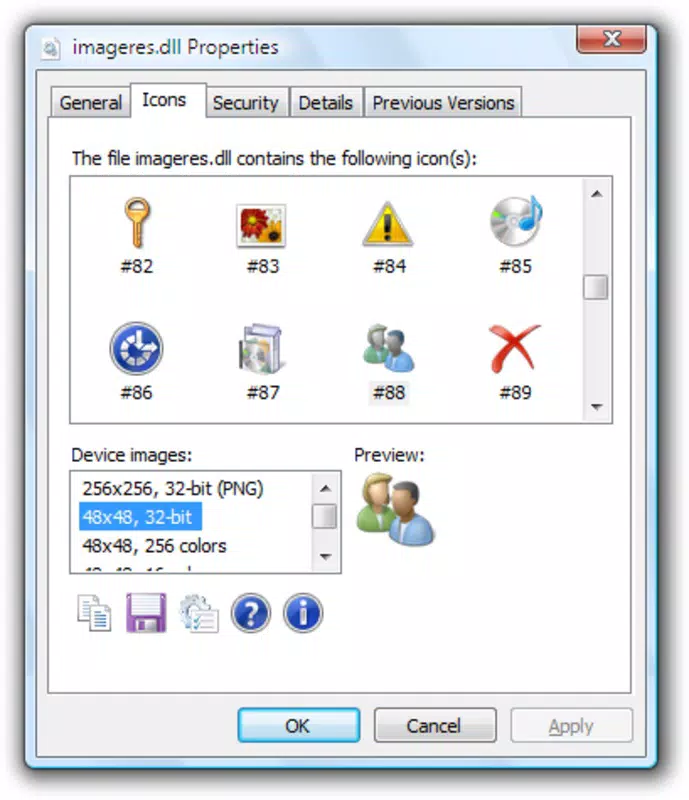
IconViewer is a utility application designed to simplify the process of locating, viewing, and managing icons embedded within various file types on Windows systems. By integrating directly with the standard file Properties menu, the tool allows users to access icon data without requiring complex workflows or additional software. This functionality makes it particularly useful for designers, developers, and power users who need to extract or reference icons from executables, DLLs, and other resource-rich files.
The application serves as a lightweight solution for those seeking to build or expand personal icon collections, reuse graphical elements in projects, or identify embedded icons that are otherwise hidden from casual inspection. Its straightforward integration with the operating system ensures minimal disruption to existing workflows. While the developer did not provide extensive background information, the tool has been available since 2008, indicating a long-standing presence in the Windows utility ecosystem.
Real-world use cases include retrieving icons for custom desktop themes, repurposing graphical assets in UI design, or identifying application branding elements. Despite its age, IconViewer remains relevant due to its focused purpose and efficient execution. The developer did not specify minimum OS requirements or compatibility details beyond the platform.
Key Features & Functionality
- Direct Access via File Properties: IconViewer extends the standard Windows Properties dialog by adding an 'Icons' tab, enabling users to view all embedded icons within a file without launching external tools.
- Save and Copy Functionality: Once an icon is selected, users can save it directly to their local storage or copy it to the clipboard for immediate use in other applications.
- Hidden Icon Discovery: The tool provides access to icons that are not visible through standard file browsing, uncovering embedded graphics that are often overlooked or inaccessible via default system tools.
- Lightweight Design: With a file size of just 1.2 MB, IconViewer consumes minimal system resources, ensuring it runs efficiently even on older or low-spec machines.
- User-Friendly Interface: The interface is designed to be intuitive and accessible, requiring no technical expertise to navigate, making it suitable for both novice and advanced users.
For example, a graphic designer working on a custom theme might use IconViewer to extract icons from system executables and incorporate them into a cohesive visual identity. Similarly, a software developer could use it to verify branding consistency across different application components. The tool’s ability to operate within the native Windows environment enhances usability and reduces learning curves.
Interface, UX & Performance
IconViewer features a clean and minimal interface that aligns with the native Windows look and feel. The layout is straightforward, with the 'Icons' tab seamlessly integrated into the file Properties window. Navigation is intuitive, requiring only a few clicks to access embedded icons. The design prioritizes clarity over complexity, ensuring users can quickly locate and interact with the desired icon.
Although the developer did not list formal performance metrics, the application’s lightweight nature suggests it operates smoothly across a wide range of Windows devices. It is expected to maintain responsiveness even when handling large files or multiple icon extractions. Stability is likely maintained due to its focused scope and minimal system integration. The tool does not introduce noticeable lag or memory overhead during operation.
Users can expect consistent behavior across different device categories, including desktops, laptops, and older systems. The absence of background processes or startup delays further supports its efficient operation. While no specific feedback on crash rates or error handling was provided, the long-standing availability of the tool suggests reliable performance over time.
Platform Compatibility & Technical Requirements
IconViewer is designed exclusively for the Windows platform. The application is compatible with Windows operating systems, though specific version details were not disclosed by the developer. The file size is listed at 1.2 MB, indicating a compact footprint that aligns with its lightweight nature.
Although the developer did not specify minimum OS requirements, the tool’s release date of 2008 suggests it was originally built for older Windows versions such as Windows XP or Vista. Its continued availability implies potential backward compatibility with modern Windows releases, though users should exercise caution when installing on newer systems without verification.
Compatibility information was not fully disclosed, so users are advised to test the application in their environment. The developer did not provide details on installation methods, update frequency, or system permissions required.
Pros and Cons
Pros
- Simple integration with Windows file Properties menu
- Efficient and lightweight with minimal resource usage
- Ability to access hidden and embedded icons
- Free to download and use with no licensing fees
- Intuitive interface suitable for users of all skill levels
Cons
- No official updates or release notes since 2008
- Compatibility with modern Windows versions not confirmed
- Limited to Windows platform only
- Developer did not provide technical specifications or support channels
- No built-in preview or batch processing features
FAQ
Is IconViewer safe to download and install?
Yes, the application is free and available from trusted sources. However, as with any third-party tool, users should ensure they download from reputable websites to avoid potential malware.
Can I use IconViewer on Windows 11 or Windows 10?
While the developer did not confirm compatibility, the tool’s long-standing presence suggests it may function on newer Windows versions. Testing on your system is recommended.
Does IconViewer require administrator privileges?
The developer did not specify permission requirements. Based on its lightweight nature, it likely operates without elevated access, but this cannot be confirmed.
Is there a mobile version of IconViewer?
No, the application is designed exclusively for Windows desktop systems and is not available for Android or iOS devices.
How often is IconViewer updated?
The last known release was in 2008. No recent updates have been published, so the tool has not been modified in over 15 years.
Final Thoughts
IconViewer remains a niche yet valuable utility for Windows users seeking a straightforward way to access embedded icons. Its minimalist design, integration with the native file system, and zero cost make it an appealing option for those needing basic icon extraction and management. While its age and lack of updates raise concerns about modern compatibility, its core functionality continues to serve its intended purpose.
Users who work with system files, design custom themes, or need to retrieve branding assets will find the tool particularly useful. For those operating on older systems or requiring a no-frills solution, IconViewer offers reliable performance without overhead.
Despite its limitations, the app delivers on its promise with minimal fuss. If you're looking for a free, lightweight icon viewer for Windows, this tool remains a viable choice.
Download IconViewer now


